



Point at the problem — car, boat, or home. fi[x]in diagnoses it on your phone, even offline, tells you how serious it is, and walks you through the fix step by step.
Less guesswork, fewer forum threads, no diagnostic fee just to find out what you're looking at. fi[x]in uses computer vision and ML to turn a photo into a diagnosis and a plan.
Point your camera at the dent, leak, warning light, or whatever's wrong. fi[x]in analyzes the photo right on your phone — or describe the problem in words instead.
You get a plain-language result — "Strong match · Car" rather than a bare percentage — a severity rating, and step-by-step repair guidance.
Work through the repair as a checklist that tracks your progress. If the fault is one that can make a car, boat, or house unsafe, fi[x]in says so and tells you to have it checked first.
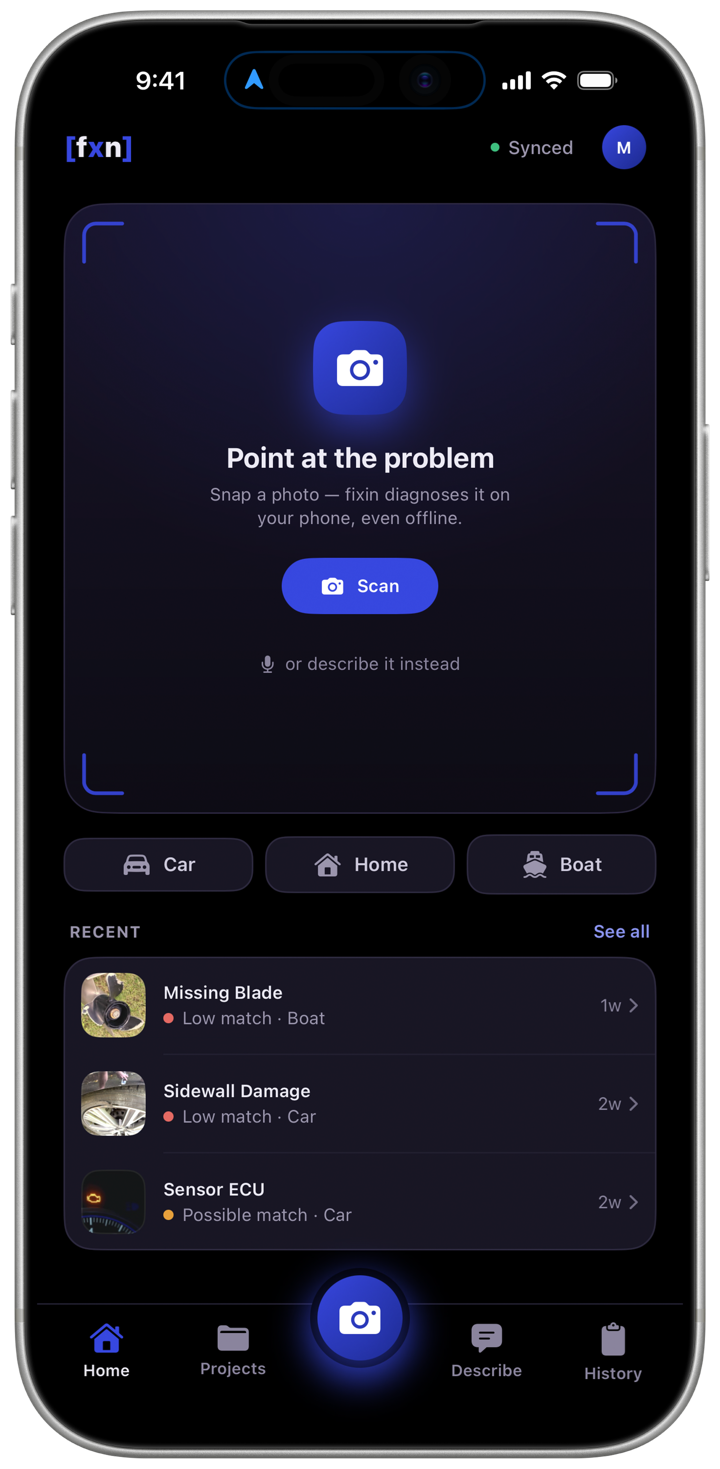
Computer vision trained on thousands of real-world repair photos. Works on cars, boats, appliances, and home systems — and the diagnosis runs on your phone, with or without signal.
2,262 built-in guides with the tools and supplies to have on hand. On iPhone and iPad, choose Beginner, Intermediate, or Pro / Tech detail.
Our sister app for hiring a professional when a job shouldn't be DIY. The pro network behind it is still being built.
Every result says how well the photo matched — strong, possible, or low — instead of a bare percentage. When a specific answer would be a guess, fi[x]in stops at the category and says so.
Every generation of fi[x]in's on-device models gets a name, so a change in your results is never silent. Switch between the engines your plan includes with a tap.
More accurate than 4.3 on the same categories, and the default on Premiere and The One.
For broader diagnosis: 13 kinds of problem Sapphire doesn't cover, from clutches to bottom fouling. A choice on paid plans.
The Vision Transformer engine first shipped in 1.4.3, now the starting engine on every plan, the free plan included.
That is so cool!! I can't believe all the models are just run locally on my phone!
I don't know how this is pulled off!
I'm amazed it can run on my old phone!
Snap the problem and find out what you're looking at. Free on iPhone, iPad, and Android, with no account needed to start.


My name is Matthew McLellan, and I'm the founder of AM Solutions, LLC — a Seattle-based software company building tools at the intersection of machine learning and hands-on repair.
I've spent years working on cars, boats, and homes. Not as a professional mechanic — as someone who genuinely loves to understand how things work and fix them when they don't. Along the way, I kept running into the same problem: figuring out what's actually wrong and what to do about it is harder than the repair itself.
"I always wished someone would make an app that could teach you how to fix anything or help you diagnose a problem. I finally decided to make one myself."
— Matthew McLellan, Founder · AM Solutions, LLC
That frustration became fi[x]in — an ML-powered app that lets you snap a photo of a problem and find out what it is, how serious it is, and how to fix it, step by step. For the jobs that shouldn't be DIY, our sister app hi[r]in is for hiring a professional; its pro network is still being built.
AM Solutions is based in the Seattle area. We're small and focused, and we want repair knowledge to be easier to get for everyone — from experienced DIYers to first-time homeowners.
fi[x]in is live on the App Store and Google Play, with fi[x]in Web in beta. The work now is broader repair coverage, better engines, and getting hi[r]in's network off the ground.

Years of hands-on repair work across cars, boats, and homes plant the seed. The question isn't "how do I fix this?" — it's "what's actually wrong?"
Matthew incorporates AM Solutions in Seattle and begins building fi[x]in — computer vision and ML diagnosis for the repairs people actually run into.
The iOS app goes live on the App Store, bringing photo-based ML diagnosis and step-by-step repair guidance to iPhone. The Android app follows in July 2026.
Repair guides in three levels of detail, and a start that doesn't need an account.
Sapphire 4.8, more accurate on the same categories, and Emerald 5.0 and 5.2, which recognize 13 more kinds of problem, with Sapphire 4.3 as every account's starting engine and a choice of engine on every plan.
fi[x]in follows your phone's language in French, Japanese, Portuguese (Brazil) and Korean too, and Emerald 5.3 joins the engines Premiere and The One can choose. Out on iPhone, iPad and Android.
The work moves outward: broader repair category coverage, fi[x]in Web out of beta, and the hi[r]in professional network getting off the ground.
fi[x]in Web out of beta, and a native desktop app after it. Investor inquiries welcome.
fi[x]in is free to download. Subscribe to see the specific fault behind a diagnosis, get a repair guide for every result, and run more diagnoses each month.

Perfect for occasional repairs. On-device photo diagnosis to the problem category, with step-by-step guides for serious problems.

The full fi[x]in experience: the specific fault, not just the category, and a repair guide for every result.

For shops, fleets, or teams. Everything in Premiere, on up to five devices, with priority support.
Not satisfied? We'll make it right. Reach out within 30 days of your initial subscription charge for a full refund — no questions asked. See our refund policy for details.
Create a free account at ams-fixin.com, pick a plan on the Plans page, and pay through Stripe. The plan switches on as soon as payment clears, and it comes with you when you sign in to the app with the same account.
Yes — Premiere and The One are monthly subscriptions that renew automatically until you cancel. To cancel, sign in at ams-fixin.com and use Cancel Subscription in the Plan section of your Account page, or email help@fixin-support.com. You keep access until the end of the month you've paid for. Basic is free and never expires.
Yes — sign in with the same account on iPhone, iPad, Android, or the web and your plan comes with you. The One covers up to five devices.
Yes — fi[x]in is on the App Store and Google Play, and fi[x]in Web is in open beta at ams-fixin.com.
Every plan diagnoses car, boat, and home problems. Premiere and The One add the specific fault and a repair guide for every result; on Basic, guides cover high-severity problems. New categories arrive with engine updates.
Email help@fixin-support.com or call (206) 295-8274. To report a bug, use the bug report form. The One plan holders receive priority response.
AM Solutions, LLC ("we," "our," or "us") respects your privacy. This Privacy Policy explains how we collect, use, share, and protect your information when you use the FIXIN mobile application (the "App"), available on the Apple App Store and Google Play, and our related websites and services (together, the "Services").
We do not knowingly collect personal information from anyone under 18. See Section 12.
We use your information for the purposes below. Where the EU/UK GDPR applies, the lawful basis for each purpose is shown.
| Purpose | Legal basis (GDPR/UK GDPR) |
|---|---|
| Provide the App, analyze your photos, and generate diagnostic results | Performance of a contract |
| Process payments and manage your account | Performance of a contract |
| Communicate about appointments, updates, and support | Performance of a contract; legitimate interests |
| Improve and secure the Services and prevent fraud | Legitimate interests |
| Collect precise location | Consent |
| Send marketing communications | Consent (or legitimate interests where permitted) |
| Comply with legal obligations | Legal obligation |
FIXIN is an AI-powered diagnostic tool. When you submit a photo, our machine-learning models analyze the image to identify a likely issue and suggest repair steps, parts, or professionals. Diagnostic results are automated suggestions, are not guaranteed to be accurate, and are not a substitute for a qualified professional's inspection.
We may use de-identified or aggregated images and data to develop and improve our models. We will not use images that identify you to train our models without a lawful basis, and where consent is required we will ask for it.
We do not sell your personal information for money, and we do not "share" it for cross-context behavioral advertising as those terms are defined under California law. We disclose personal information only to the following categories of recipients:
We are based in the United States and process data there. If you access the Services from outside the United States, your information will be transferred to and processed in the U.S. and other countries whose data-protection laws may differ from yours.
For transfers of personal data from the EEA, the United Kingdom, or Switzerland, we rely on appropriate safeguards, including the European Commission's Standard Contractual Clauses and the UK International Data Transfer Addendum, or another lawful mechanism. You may request a copy of the safeguards we use by contacting us.
We keep personal information only as long as necessary for the purposes described in this Policy, then delete or de-identify it. General guidelines:
| Data type | Retention |
|---|---|
| Account information | For the life of your account, then deleted or de-identified within a reasonable period after closure |
| Photos and diagnostic results | Retained to provide history and support; deletable on request; de-identified copies may be kept for model improvement |
| Payment records | As required for tax, accounting, and legal obligations |
| Usage and device logs | Typically a limited period for security and analytics |
We use reasonable administrative, technical, and physical safeguards designed to protect your personal information from unauthorized access, loss, or misuse. No method of transmission or storage is completely secure, so we cannot guarantee absolute security. Our handling of device permissions (camera, photos, location) follows applicable Apple App Store and Google Play developer and data-safety policies.
Depending on where you live, you may have some or all of the following rights: to access a copy of your personal information; to correct inaccurate information; to delete your information; to port your information; to restrict or object to certain processing; and to withdraw consent. You may also opt out of marketing at any time.
To exercise these rights, email us at help@fixin-support.com, use in-App controls, or contact us using Section 14. We will verify your identity using information reasonable to the request. We respond within the timelines the law requires — generally within 30 days (EEA/UK) or 45 days (California), with an extension where permitted. You will not be discriminated against for exercising your rights.
You have the right to lodge a complaint with your local supervisory authority (for example, your national Data Protection Authority, or the UK ICO). We will always try to resolve concerns directly first.
If you are a California resident, you have the rights described above, plus the right to know the categories and specific pieces of personal information we collect, the right to opt out of the sale or sharing of personal information, and the right to limit the use of sensitive personal information. We do not sell or share personal information as defined by the CCPA, and we use sensitive personal information (such as precise location) only to provide the Services you request.
Categories of personal information we collect (CCPA):
You may submit requests via help@fixin-support.com or Section 14, and you may use an authorized agent. We will confirm receipt within 10 business days and respond within 45 days (extendable by 45 days with notice).
The Services may link to or integrate with third parties (for example, payment processors, mapping tools, and app stores). Their privacy practices are governed by their own policies, and we are not responsible for them. Review their policies before using them.
If we experience a personal-data breach that legally requires notification, we will notify affected users and applicable authorities within the timeframes and manner required by law.
The Services are intended for users 18 and older and are not directed to children. We do not knowingly collect personal information from anyone under 18. If you believe a minor has provided us information, contact us at help@fixin-support.com and we will delete it.
We may update this Privacy Policy from time to time. Material changes will be posted with a revised "Last Updated" date and, where required, communicated to you directly.
For privacy questions or requests:
AM Solutions, LLC
Email: help@fixin-support.com
Phone: (206) 295-8274
Address: 6910 94th Ave SE, Mercer Island, WA 98040, United States
The FIXIN application ("Licensed Application" or "App") is licensed to you ("You" or "End-User") by AM Solutions, LLC ("Licensor," "we," "us," or "our"), for use only under the terms of this License Agreement. References in this Agreement to the "App Distributors" mean Apple Inc. and Google LLC and their affiliates, through whose stores the App is distributed.
By downloading or using the Licensed Application and any update to it, you agree to be bound by all of the terms of this License Agreement. If you do not agree, do not download or use the App. The Licensor reserves all rights not expressly granted to you.
FIXIN is a software application that uses artificial intelligence to analyze photographs you submit and generate diagnostic results and repair guidance for home, automotive, and marine issues. It is designed for iOS and Android mobile devices ("Devices"). Diagnostic results are informational suggestions only and are not guaranteed to be accurate or complete.
Subject to your compliance with this Agreement, the Licensor grants you a limited, non-exclusive, non-transferable, non-sublicensable, revocable license to download and use one copy of the Licensed Application on Devices that you own or control, solely for your personal, non-commercial use, in accordance with the usage rules of the applicable App Distributor.
You may not: (a) rent, lease, lend, sell, redistribute, or sublicense the App; (b) copy (except as expressly permitted), decompile, reverse engineer, disassemble, or attempt to derive the source code of the App, except to the extent applicable law prohibits this restriction; (c) modify or create derivative works of the App; (d) remove or alter any proprietary notices; or (e) use the App for any unlawful purpose or in any way that could damage or impair the App or the Services.
The Licensed Application requires a compatible iOS or Android device, an internet connection for cloud-based analysis, and permission to access your camera and photos to submit images. Certain features (such as scheduling near you) require location access. The Licensor is not responsible for your device, network, or data charges, and does not warrant that the App will operate on every device or with every configuration.
AM Solutions, LLC is not obligated to provide maintenance, updates, or technical support for the Licensed Application, and may do so at its discretion on a best-effort basis. The App Distributors have no obligation whatsoever to furnish any maintenance or support for the App.
The App allows you to submit photographs, notes, and related information (your "Submissions") so it can provide diagnostic results. Your Submissions are handled in accordance with our Privacy Policy. Submissions are generally private to your account and are not published to other users. When you make a Submission, you represent and warrant that:
You retain ownership of your Submissions. You grant the Licensor and its service providers a limited, worldwide, royalty-free license to host, store, process, and analyze your Submissions solely to provide, secure, and improve the Services, and as otherwise described in the Privacy Policy. We may use de-identified or aggregated data to improve our models. If you provide feedback or suggestions, you agree we may use them without restriction or compensation.
TO THE MAXIMUM EXTENT PERMITTED BY LAW, THE LICENSED APPLICATION IS PROVIDED "AS IS" AND "AS AVAILABLE," AND YOUR USE OF IT IS AT YOUR OWN RISK. DIAGNOSTIC RESULTS AND REPAIR GUIDANCE ARE INFORMATIONAL ONLY. YOU ARE RESPONSIBLE FOR EVALUATING THE GUIDANCE AND FOR ANY REPAIR YOU CHOOSE TO ATTEMPT. FOR ANY REPAIR THAT COULD AFFECT SAFETY — INCLUDING ELECTRICAL, GAS, STRUCTURAL, BRAKE, FUEL, OR MARINE SYSTEMS — CONSULT A QUALIFIED LICENSED PROFESSIONAL.
TO THE MAXIMUM EXTENT PERMITTED BY LAW, THE LICENSOR WILL NOT BE LIABLE FOR ANY INDIRECT, INCIDENTAL, SPECIAL, CONSEQUENTIAL, OR PUNITIVE DAMAGES, OR FOR ANY PROPERTY DAMAGE OR PERSONAL INJURY ARISING FROM RELIANCE ON DIAGNOSTIC RESULTS. THE LICENSOR'S TOTAL LIABILITY FOR ANY CLAIM RELATING TO THE APP WILL NOT EXCEED THE AMOUNT YOU PAID FOR THE APP IN THE SIX (6) MONTHS BEFORE THE CLAIM AROSE. NOTHING IN THIS AGREEMENT LIMITS LIABILITY THAT CANNOT BE LIMITED UNDER APPLICABLE LAW, INCLUDING LIABILITY FOR GROSS NEGLIGENCE, WILLFUL MISCONDUCT, OR MATTERS THAT LAW PROHIBITS EXCLUDING.
The Licensor warrants that, at the time of your download, the Licensed Application is free of malware to the Licensor's knowledge. Except for this limited warranty and to the maximum extent permitted by law, the App is provided without warranties of any kind, express or implied, including implied warranties of merchantability, fitness for a particular purpose, and non-infringement. No warranty applies to an App that has been modified without authorization, used with incompatible hardware or software, or affected by causes outside the Licensor's control.
If the App fails to conform to any applicable warranty, you may notify the applicable App Distributor, and it may refund the purchase price (if any). To the maximum extent permitted by law, the App Distributor will have no other warranty obligation with respect to the App.
AM Solutions, LLC, and not the App Distributors, is responsible for addressing any claims relating to the Licensed Application or your use of it, including product-liability claims, claims that the App fails to meet a legal or regulatory requirement, and claims under consumer-protection or privacy law, except to the extent such claims arise from the App Distributors' own services.
You represent and warrant that you are not located in a country subject to a U.S. Government embargo or designated as a "terrorist-supporting" country, and that you are not on any U.S. Government list of prohibited or restricted parties. You will comply with all applicable laws in using the App.
This license is effective until terminated by you or AM Solutions, LLC. Your rights terminate automatically if you fail to comply with any term of this Agreement. On termination, you must stop using the App and delete all copies. Sections that by their nature should survive termination will survive.
You must comply with the applicable App Distributor's terms of service and any third-party terms that apply to your use of the App. You acknowledge and agree that Apple Inc. and Google LLC, and their subsidiaries, are third-party beneficiaries of this Agreement, and each will have the right to enforce this Agreement against you as a third-party beneficiary.
As between you and AM Solutions, LLC, AM Solutions, LLC owns or licenses all intellectual-property rights in the App, other than your Submissions. In the event of a third-party claim that the App infringes intellectual-property rights, AM Solutions, LLC, and not the App Distributors, will be responsible for the investigation, defense, settlement, and discharge of the claim to the extent required by law.
This Agreement is governed by the laws of the State of Washington, excluding its conflict-of-law rules. The parties consent to the exclusive jurisdiction of the state and federal courts located in King County, Washington, except where applicable consumer-protection law provides otherwise.
If any provision of this Agreement is or becomes invalid, the remaining provisions remain in effect, and the invalid provision will be replaced by a valid one that best achieves its purpose. Amendments must be in writing. This Agreement, together with the Terms of Service and Privacy Policy, is the entire agreement between you and us regarding the App.
AM Solutions, LLC
6910 94th Ave SE, Mercer Island, WA 98040, United States
Phone: (206) 295-8274
Email: help@fixin-support.com
fixin — operated by AM Solutions, LLC
We are AM Solutions, LLC ("Company," "we," "us," "our"), registered in Washington, United States, at 6910 94th Ave SE, Mercer Island, WA 98040, United States. We operate the website www.amsolutions-sea.com (the "Site"), the fixin mobile application at www.ams-fixin.com (the "App"), and related products and services (collectively, the "Services").
fixin is an AI-powered diagnostic and repair-orchestration platform. It analyzes images to identify likely issues across home, automotive, and marine environments and delivers step-by-step guidance, suggested parts, or access to qualified professionals. Diagnostic results are automated suggestions and are not guaranteed.
You can contact us by phone at (206) 295-8274, by email at help@fixin-support.com, or by mail at 6910 94th Ave SE, Mercer Island, WA 98040, United States.
These Terms constitute a legally binding agreement between you and AM Solutions, LLC. By accessing or using the Services, you confirm that you have read, understood, and agree to be bound by these Terms. IF YOU DO NOT AGREE, DO NOT USE THE SERVICES.
We may modify these Terms at any time. We will update the "Last Updated" date and, for material changes, take reasonable steps to notify you. Your continued use after changes take effect means you accept the revised Terms.
The Services are intended for users who are at least 18 years old. Persons under 18 may not use or register for the Services.
The information provided through the Services is not intended for use where it would be contrary to law. Those who access the Services from other locations do so on their own initiative and are responsible for compliance with local laws.
The Services are not designed to comply with industry-specific regulations such as HIPAA, FISMA, or GLBA. If your interactions would be subject to such laws, do not use the Services.
SAFETY DISCLAIMER: FIXIN PROVIDES AUTOMATED DIAGNOSTIC SUGGESTIONS BASED ON THE IMAGES AND INFORMATION YOU PROVIDE. A DIAGNOSIS IS NEVER CERTAIN, AND RECOMMENDED SOLUTIONS ARE NOT GUARANTEED TO RESOLVE YOUR ISSUE. REPAIRS CAN INVOLVE RISK OF PROPERTY DAMAGE, SERIOUS INJURY, OR DEATH — ESPECIALLY THOSE INVOLVING ELECTRICAL, GAS, STRUCTURAL, BRAKE, FUEL, OR MARINE SYSTEMS. FIXIN IS NOT A SUBSTITUTE FOR INSPECTION OR SERVICE BY A LICENSED PROFESSIONAL. YOU ASSUME ALL RISK FROM ANY REPAIR YOU CHOOSE TO ATTEMPT, AND YOU SHOULD RETAIN A QUALIFIED PROFESSIONAL WHENEVER SAFETY MAY BE AFFECTED.
We own or license all intellectual-property rights in the Services, including source code, databases, software, designs, text, photographs, graphics (the "Content"), and our trademarks, service marks, and logos (the "Marks"). The Content and Marks are protected by law and provided "AS IS" for your personal, non-commercial use or internal business purpose only.
Subject to these Terms, we grant you a non-exclusive, non-transferable, revocable license to access the Services and download or print portions of the Content to which you have properly gained access, solely for your personal, non-commercial use or internal business purpose. No other use is permitted without our prior written permission (email help@fixin-support.com). We reserve all rights not expressly granted.
Submissions: If you send us feedback, suggestions, or ideas about the Services ("Submissions"), you agree we may use them for any lawful purpose without compensation or acknowledgment.
Contributions: If the Services allow you to submit content — including the photos, notes, and information you provide for diagnosis ("Contributions") — you retain ownership of your Contributions. You grant us a worldwide, non-exclusive, royalty-free license to host, store, process, analyze, and use your Contributions to provide, secure, and improve the Services and as described in our Privacy Policy. We may use de-identified or aggregated data to improve our models.
You are responsible for your Contributions and represent that you have the rights to submit them, that they do not infringe any third party's rights, and that they are not unlawful, harassing, obscene, or otherwise objectionable. We may remove or edit Contributions that we reasonably believe violate these Terms.
By using the Services, you represent and warrant that: (1) your registration information is true and accurate and will be kept current; (2) you have legal capacity and agree to these Terms; (3) you are at least 18 years old; (4) you will not access the Services through automated or non-human means; (5) you will not use the Services for any illegal or unauthorized purpose; and (6) your use will not violate any applicable law. If any information you provide is untrue or incomplete, we may suspend or terminate your account.
You may be required to register to use the Services. Keep your password confidential; you are responsible for all use of your account. We may remove or reclaim a username we determine is inappropriate or objectionable.
We bill you directly and accept major payment methods (for example, Visa, Mastercard, American Express, and Discover) through our third-party payment processor.
You agree to provide current, complete, and accurate purchase and account information and to promptly update it. Applicable taxes may be added. All payments are in U.S. dollars. We may correct pricing errors even after an order is placed, and we may refuse or limit any order.
Some Services are offered on a subscription basis.
Subscriptions automatically renew for successive billing periods (for example, monthly) at the then-current price until cancelled. By subscribing, you authorize recurring charges to your payment method until you cancel.
You can cancel anytime with Cancel Subscription in the Plan section of your Account page at ams-fixin.com, or by emailing help@fixin-support.com. Cancellation takes effect at the end of the current billing period. Refunds are covered by our Refund Policy.
Before you subscribe we will present the price, billing frequency, and renewal terms, and we will obtain your affirmative consent. We will send renewal or price-change notices where required by law, and you may cancel to avoid future charges.
You may not use the Services for any purpose other than that for which we make them available. Among other things, you agree not to:
If you access the Services via the App, we grant you a revocable, non-exclusive, non-transferable, limited license to install and use the App on devices you own or control, subject to these Terms and the App's End User License Agreement. You may not decompile or reverse engineer the App (except as permitted by law), create derivative works, use it for unlawful or unauthorized commercial purposes, or make it available to multiple users at once.
Apple and Google devices: your license is limited to use on a device running iOS or Android under the applicable store's usage rules. We are not obligated to provide maintenance or support, and each app store has no such obligation. If the App fails to conform to a warranty, you may notify the applicable store, which may refund the purchase price. You represent that you are not on a U.S. embargo or prohibited-party list, and you agree that Apple and Google are third-party beneficiaries of these App terms and may enforce them against you.
The Services may link to third-party websites and content that we do not control or monitor. We are not responsible for their accuracy, appropriateness, privacy practices, or policies. If you access third-party websites or content, you do so at your own risk, and their terms — not ours — govern. Any purchases through third parties are solely between you and that party.
We reserve the right (but not the obligation) to monitor the Services for violations, take legal action against violators, refuse or restrict access to the Services, remove burdensome or unlawful content, and otherwise manage the Services to protect our rights and ensure proper functioning.
We care about data privacy and security. Please review our Privacy Policy at https://www.amsolutions-sea.com/privacypolicy. By using the Services, you agree to the Privacy Policy, which is incorporated into these Terms. The Services are hosted in the United States; if you use them from elsewhere, you consent to the transfer and processing of your data in the United States, subject to the safeguards described in the Privacy Policy.
We respect others' intellectual-property rights. If you believe material on the Services infringes your copyright, please send a notice to our designated agent with the elements required by the Digital Millennium Copyright Act (identification of the work, the material, your contact information, a good-faith statement, a statement of accuracy under penalty of perjury, and your signature). Misrepresentations may create liability.
Designated Copyright Agent:
Matthew McLellan (Founder), AM Solutions, LLC
6910 94th Ave SE, Mercer Island, WA 98040, United States
Email: help@fixin-support.com
These Terms remain in effect while you use the Services. We may, in our sole discretion and without notice, deny access to the Services to anyone for any lawful reason, including breach of these Terms. We may terminate your account and remove content at any time. If we terminate your account, you may not re-register under another name. Termination does not limit our other legal remedies.
We may change, modify, or remove Services content at any time without notice, and we may modify or discontinue the Services. We are not liable for any modification, price change, suspension, or discontinuance of the Services. We do not guarantee the Services will be available at all times and may experience interruptions; you agree we are not liable for losses caused by downtime, to the extent permitted by law.
These Terms and your use of the Services are governed by the laws of the State of Washington, without regard to conflict-of-law principles.
Any legal action relating to the Services shall be brought exclusively in the state or federal courts located in King County, Washington, and the parties consent to jurisdiction and venue there. The U.N. Convention on Contracts for the International Sale of Goods and UCITA are excluded. To the extent permitted by law, any claim must be brought within one (1) year after the cause of action arises; this limitation does not apply where prohibited by law.
The Services may contain typographical errors or inaccuracies. We may correct any errors and update information at any time without prior notice.
THE SERVICES ARE PROVIDED ON AN "AS-IS" AND "AS-AVAILABLE" BASIS. YOUR USE IS AT YOUR SOLE RISK. TO THE FULLEST EXTENT PERMITTED BY LAW, WE DISCLAIM ALL WARRANTIES, EXPRESS OR IMPLIED, INCLUDING MERCHANTABILITY, FITNESS FOR A PARTICULAR PURPOSE, AND NON-INFRINGEMENT. WE MAKE NO WARRANTY ABOUT THE ACCURACY OR COMPLETENESS OF DIAGNOSTIC RESULTS OR OTHER CONTENT, AND WE ARE NOT RESPONSIBLE FOR THIRD-PARTY PRODUCTS OR SERVICES. YOU SHOULD USE YOUR OWN JUDGMENT AND, WHERE SAFETY MAY BE AFFECTED, CONSULT A LICENSED PROFESSIONAL.
TO THE MAXIMUM EXTENT PERMITTED BY LAW, WE AND OUR DIRECTORS, EMPLOYEES, AND AGENTS WILL NOT BE LIABLE FOR ANY INDIRECT, CONSEQUENTIAL, EXEMPLARY, INCIDENTAL, SPECIAL, OR PUNITIVE DAMAGES, INCLUDING LOST PROFITS OR DATA, ARISING FROM YOUR USE OF THE SERVICES. OUR TOTAL LIABILITY FOR ANY CLAIM WILL NOT EXCEED THE AMOUNT YOU PAID TO US IN THE SIX (6) MONTHS BEFORE THE CLAIM AROSE, OR USD $100 IF YOU PAID NOTHING.
NOTHING IN THESE TERMS EXCLUDES OR LIMITS LIABILITY THAT CANNOT BE EXCLUDED OR LIMITED UNDER APPLICABLE LAW, INCLUDING LIABILITY FOR DEATH OR PERSONAL INJURY CAUSED BY NEGLIGENCE, FRAUD, OR GROSS NEGLIGENCE OR WILLFUL MISCONDUCT. SOME JURISDICTIONS DO NOT ALLOW CERTAIN LIMITATIONS, SO SOME OF THE ABOVE MAY NOT APPLY TO YOU, AND YOU MAY HAVE ADDITIONAL RIGHTS.
You agree to defend, indemnify, and hold us harmless (including our affiliates, officers, agents, and employees) from any loss, liability, claim, or demand, including reasonable attorneys' fees, arising from: (1) your Contributions; (2) your use of the Services; (3) your breach of these Terms or your representations; (4) your violation of a third party's rights; or (5) any harmful act toward another user. We may assume the exclusive defense of any matter subject to indemnification, and you agree to cooperate.
We maintain certain data you transmit to manage the Services and perform routine backups. You are responsible for your own data. To the extent permitted by law, we are not liable for any loss or corruption of such data.
You consent to receive communications from us electronically and agree that electronic agreements, notices, disclosures, and records satisfy any legal requirement that they be in writing. You consent to electronic signatures and records, to the extent permitted by law.
California residents may report complaints to the Complaint Assistance Unit of the Division of Consumer Services of the California Department of Consumer Affairs at 1625 North Market Blvd., Suite N 112, Sacramento, CA 95834, or by phone at (800) 952-5210. California privacy rights are described in our Privacy Policy.
These Terms, together with our Privacy Policy and EULA, are the entire agreement between you and us. Our failure to enforce any right is not a waiver. If any provision is unenforceable, the remaining provisions remain in effect. We may assign our rights and obligations. We are not liable for any failure to perform caused by events beyond our reasonable control. No joint venture, partnership, or agency relationship is created by these Terms.
AM Solutions, LLC
6910 94th Ave SE, Mercer Island, WA 98040, United States
Phone: (206) 295-8274
Email: help@fixin-support.com
fixin — operated by AM Solutions, LLC
This Refund Policy explains how refunds work for paid subscriptions to the fixin mobile application (the "App") and related services operated by AM Solutions, LLC ("we," "us," or "our"). It forms part of, and should be read together with, our Terms of Service.
We stand behind fixin. If you are not satisfied with a paid subscription for any reason, you may request a full refund within 30 days of your initial subscription purchase — no questions asked.
This guarantee applies to the first subscription charge on your account. There is nothing you need to prove and no specific reason required; just contact us within the 30-day window.
Subscriptions are billed directly by us through our secure checkout. To request a refund, email help@fixin-support.com with the email address on your account and the date of purchase, and we will process your refund.
Subscriptions renew automatically until cancelled. A refund is different from a cancellation:
To avoid a future renewal charge, cancel before your renewal date — use Cancel Subscription in the Plan section of your Account page at ams-fixin.com, or contact us. After you cancel, you keep access until the end of the period you already paid for.
The 30-day guarantee applies to your initial purchase. Renewal charges after the first 30 days are generally non-refundable, but if something goes wrong, contact us — we review requests in good faith and will always comply with applicable law.
Approved refunds are returned to the original payment method, typically within 5–10 business days, though your bank or card issuer may take additional time to post the credit.
Nothing in this policy limits any refund or cancellation rights you may have under the consumer-protection laws that apply to you. Where local law gives you stronger rights than this policy, those rights apply.
We may update this Refund Policy from time to time. We will post changes with a revised "Last Updated" date, and the policy in effect at the time of your purchase governs that purchase.
Questions about a refund or this policy? Contact us:
AM Solutions, LLC
Email: help@fixin-support.com
Phone: (206) 295-8274
6910 94th Ave SE, Mercer Island, WA 98040, United States
This Acceptable Use Policy ("AUP") governs your use of the fixin mobile application and any related services provided by AM Solutions, LLC. By using our Services, you agree to comply with this policy.
You may use the Services only for lawful, personal, non-commercial purposes — specifically for diagnosing and repairing vehicles, marine vessels, and home systems using the fixin app's ML capabilities.
You may not use the Services to:
Any content you submit through the App (including photos and descriptions) must be accurate, relevant to the repair task at hand, and must not violate any third-party rights. You retain ownership of your submitted content; by submitting it, you grant AM Solutions a limited license to process it for the purpose of providing diagnostic services.
AM Solutions reserves the right to investigate and take appropriate action against anyone who, in our sole discretion, violates this AUP. This may include removing content, suspending or terminating accounts, and reporting violations to law enforcement authorities.
We may update this Acceptable Use Policy from time to time. Continued use of the Services after changes take effect constitutes acceptance of the revised policy.
AM Solutions, LLC
Email: help@fixin-support.com
Phone: (206) 295-8274
Seattle, WA
Snap a photo of the problem and fi[x]in tells you what it's looking at, how sure it is, and how serious it is — then walks you through the repair one step at a time.
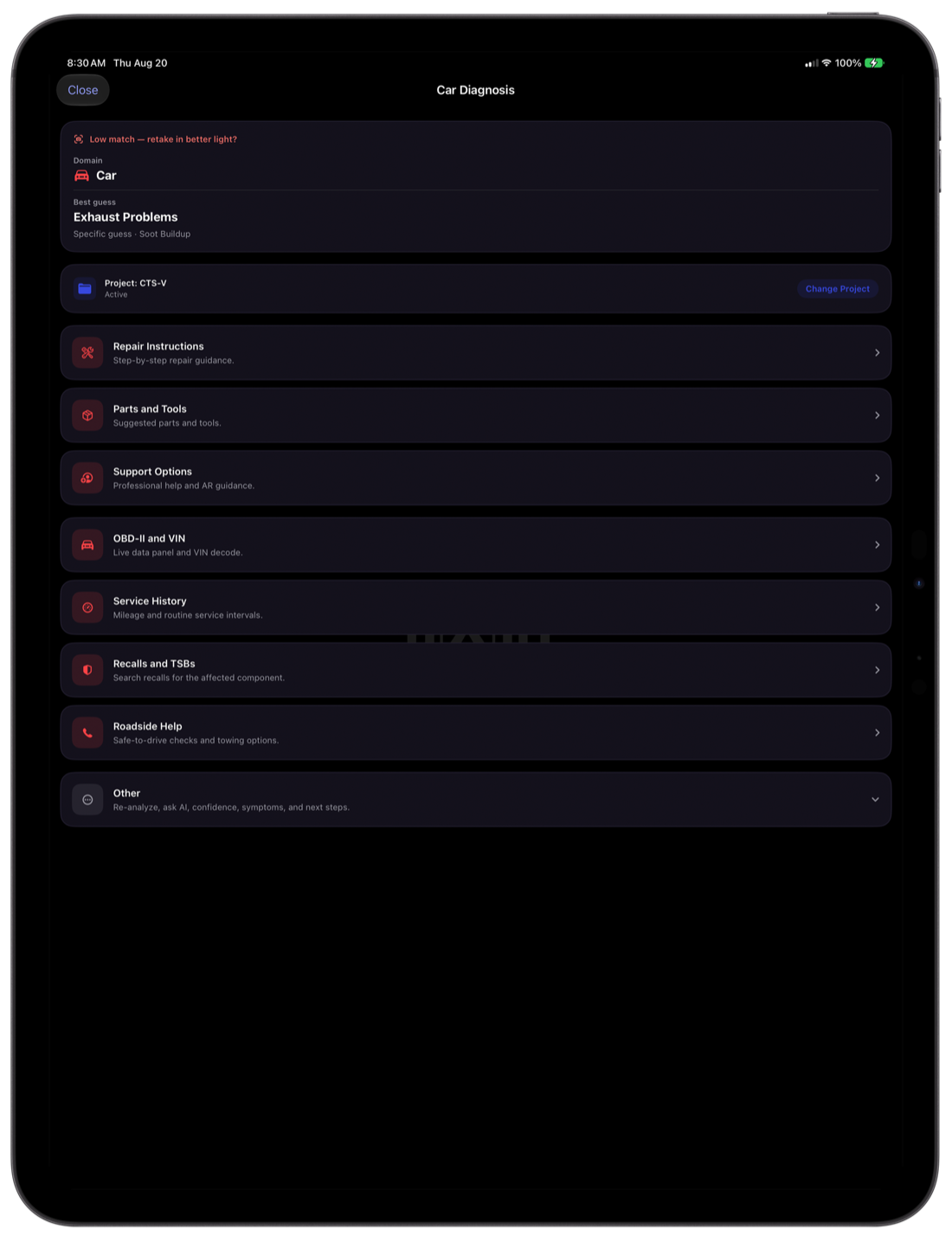
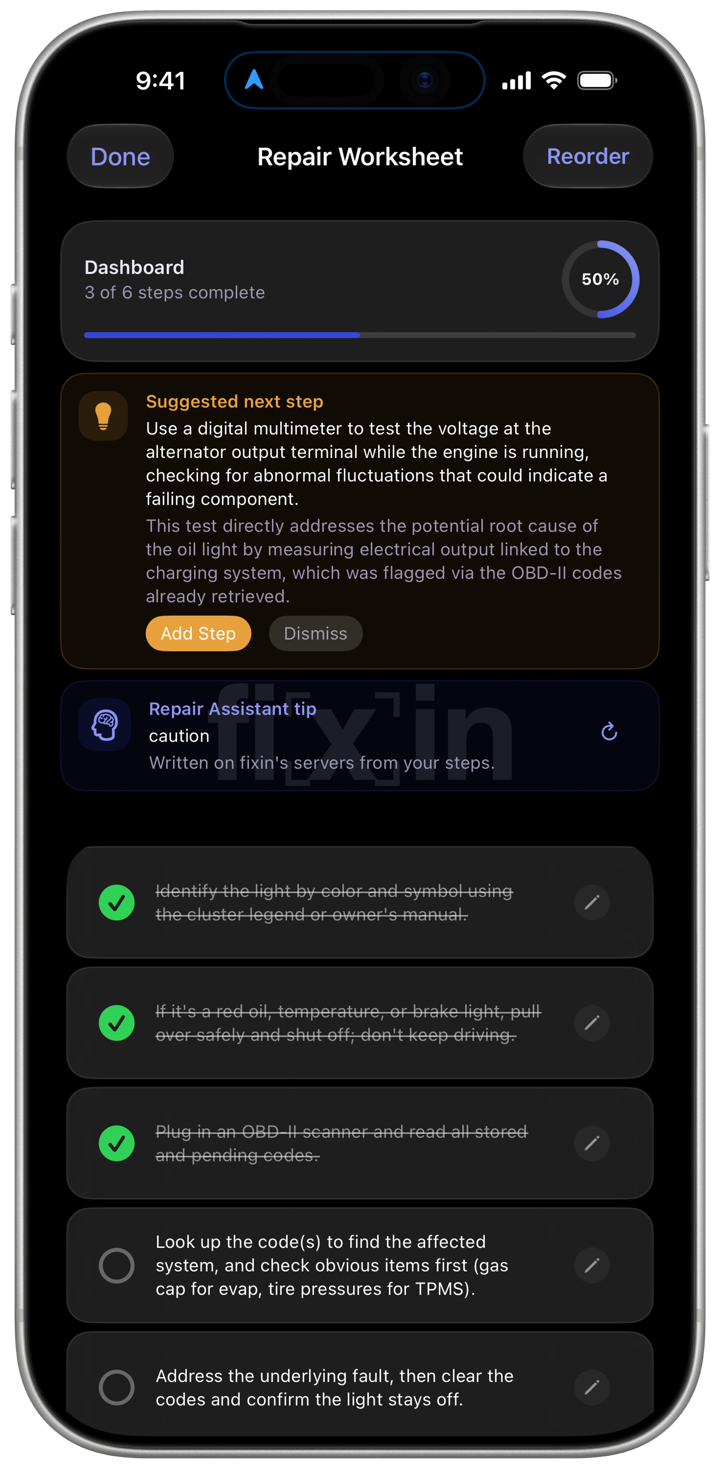
The diagnosis runs on your phone. Nothing is uploaded to identify the photo, so it works the same in a crawl space, a parking garage, or out on the water with no signal.
On iPhone and iPad every built-in guide comes in Beginner, Intermediate, and Pro / Tech. Beginner starts with visual checks and clear points to stop and call a pro; Pro / Tech goes straight to testing.
On iPhone, iPad, and Android you can scan as a guest and sign in later, when you want backups and the Repair Assistant. What happens to your data is spelled out in the privacy policy, not summarized into a promise.
Every generation of fi[x]in's on-device models carries a gem name and a version, so you can tell which engine produced a diagnosis — and a change in your results is never silent.
fi[x]in 1.5.0 added two more, 1.5.1 built in Emerald 5.2, and 1.5.2 adds Emerald 5.3. Sapphire 4.3 is now the starting engine on every account, the way Ruby 3.9 was. Premiere and The One start on Sapphire 4.8, and can switch to Emerald when a problem might fall outside Sapphire's categories. Every account can choose among the engines its plan includes, on iPhone, iPad and Android: Settings › Diagnosis Engine lists the newest version of each, with earlier ones under Other Models.
Our most accurate engine yet. It covers the same categories as Sapphire 4.3 and names the right category, and the specific fault, more often.
Built for broader diagnosis. It recognizes 13 kinds of problem Sapphire doesn't, from clutches and spark plugs to bottom fouling, fences and showers. On the categories Sapphire already covers it's level with Sapphire 4.8. Sapphire 4.8 stays the default; Emerald is a choice.
Built around a Vision Transformer, retrained for 4.3 and first shipped in 1.4.3. Since 1.5.0 it's the starting engine on every account, the free plan included.
The first Emerald, from fi[x]in 1.5.0. It keeps two categories that 5.2 folds together: flat tires apart from tires and wheels, and boat navigation apart from marine electronics.
The engine fi[x]in 1.3.9 introduced, and the free plan's engine until 1.5.0. It diagnoses car, boat, and home problems without the photo leaving your device.
Home
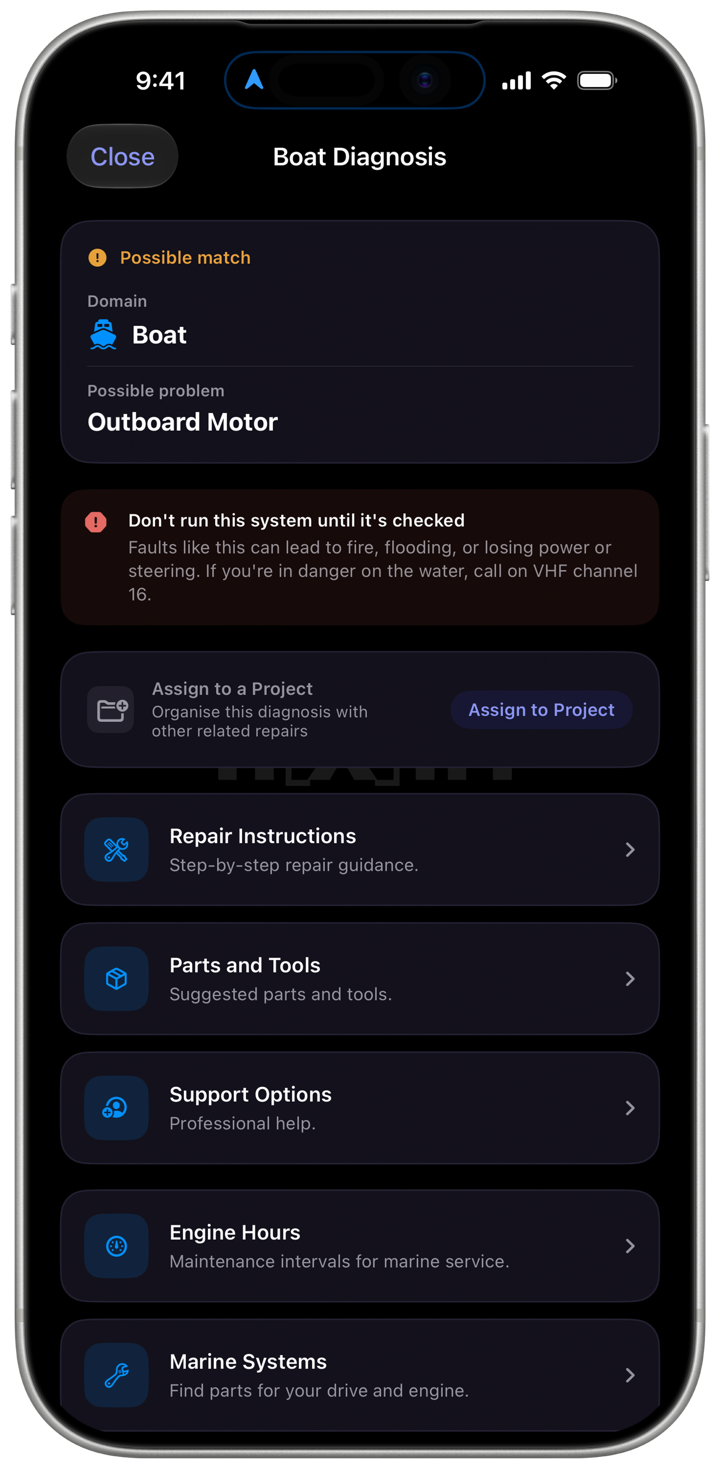
Marine Diagnosis
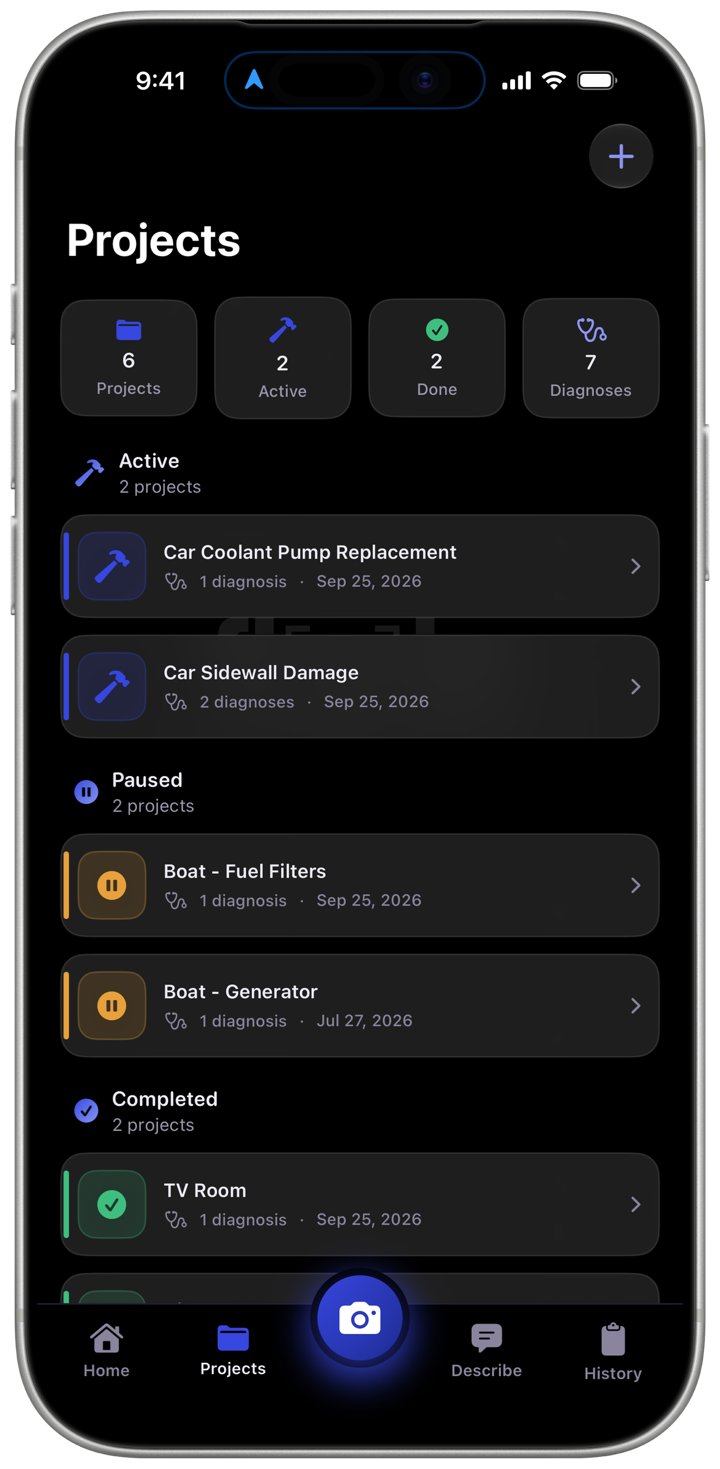
Projects
Repair Worksheet
Settings › Diagnosis Engine shows just the newest version of each engine. If your plan includes earlier versions, they're under Other Models, at the end of the list.
fi[x]in follows your phone's language in French, Japanese, Portuguese (Brazil) and Korean too. Screens and menus change; diagnosis names, repair guides and tips stay in English.
Premiere and The One can switch to Emerald 5.3. Sapphire 4.8 stays the default.
Free on the App Store and Google Play. Point it at the problem and see what you're dealing with.